Using Windows 7 in 2025: Risks, Mitigation Strategies, and Alternatives
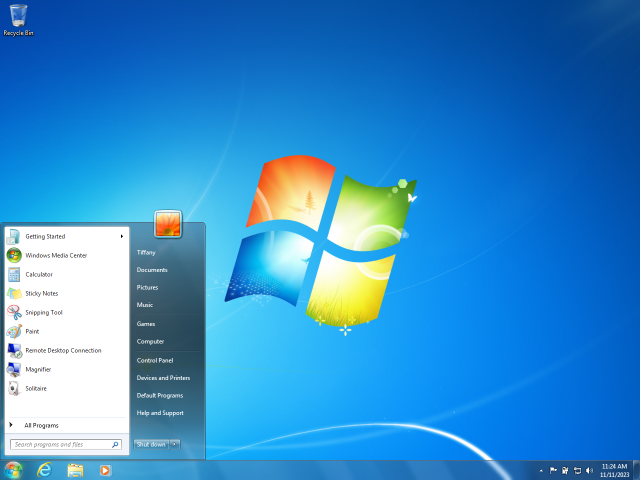
Windows 7, released in 2009, remains a nostalgic favorite for its stability, user-friendly interface, and lightweight performance. However, as of October 2025, its official support from Microsoft has long ended. Mainstream support ceased on January 13, 2015, extended support on January 14, 2020, and even the paid Extended Security Updates (ESU) program concluded on January 10, 2023. Despite this, estimates suggest that around 9.15% of Windows PCs are still running Windows 7 in 2025. This article explores why people continue using it, the associated risks, ways to secure it, community resources, and viable alternatives.
Why Stick with Windows 7 in 2025?
Many users cling to Windows 7 due to its simplicity and compatibility with older hardware and software. Legacy applications that don’t run well on newer versions like Windows 10 or 11 often keep systems anchored to this OS. For instance, some specialized software in industries like manufacturing or creative fields relies on Windows 7’s architecture. Additionally, older machines may not meet the hardware requirements for upgrades, such as TPM 2.0 for Windows 11. Nostalgia plays a role too—users appreciate the Aero interface and straightforward Start menu without the bloat of modern updates.
Communities on forums report using it for offline tasks, gaming older titles, or as a secondary system. However, with no official updates since 2023, compatibility with new software and websites is diminishing.
The Security Risks of Running Windows 7

Using an unsupported OS like Windows 7 in 2025 exposes users to significant vulnerabilities. Without security patches, known exploits remain unaddressed, making systems prime targets for malware, ransomware, and hacking attempts. Security experts warn that even with antivirus software, the lack of OS-level fixes increases risks exponentially over time.
Key risks include:
- Unpatched Vulnerabilities: New threats discovered after 2023 won’t be fixed, leaving doors open for attacks.
- Incompatible Software: Modern browsers and apps may drop support, forcing users to outdated versions prone to exploits.
- Data Breaches: Connected devices risk personal data theft, especially if used for banking or email.
- No Technical Support: Microsoft won’t assist with issues, and third-party support is limited.
Reports from 2025 indicate that while some users haven’t faced issues, the consensus is that it’s increasingly dangerous for daily online use.
How to Secure Windows 7 Post-Support
If upgrading isn’t feasible, mitigate risks with these strategies. Note that these are not foolproof but can reduce exposure.
- Install Third-Party Antivirus: Use tools like Malwarebytes or Bitdefender, which still support Windows 7. Keep them updated.
- Enable Firewall and Use a Router: Ensure Windows Firewall is active, and use a modern router with built-in security features.
- Adopt Safe Browsing Habits: Use ad-blockers like uBlock Origin on supported browsers (e.g., older Chrome versions). Avoid suspicious downloads and emails.
- Isolate the System: Keep Windows 7 offline for sensitive tasks or use it in a virtual machine on a newer OS.
- Regular Backups: Back up data to external drives or cloud services to prevent loss from ransomware.
- Software Alternatives: Switch to open-source apps that still work on Windows 7, like LibreOffice or VLC.
Forums suggest behavioral security is key—avoiding risky sites is more effective than tech alone.
Communities and Forums for Windows 7 Users
Despite its age, active communities persist:
- Seven Forums: A dedicated site for discussions, tips, and troubleshooting. Visit Seven Forums
- Reddit’s r/windows7: Users share experiences and security advice. Visit r/windows7
- Wilders Security Forums: Focuses on security for older OSes. Visit Wilders Security
- BleepingComputer and My Digital Life: Offer technical support and tweaks. Visit BleepingComputer | Visit My Digital Life
These groups often discuss unofficial patches or workarounds, but proceed with caution as they aren’t verified by Microsoft.
Alternatives to Windows 7

Upgrading is the safest long-term solution. Consider these options:
- Windows 10: Support ends October 14, 2025, but ESU will be available afterward. It’s a direct upgrade path for most Windows 7 hardware.
- Windows 11: Requires compatible hardware (e.g., TPM 2.0). Offers modern features and security.
- Linux Distributions: Free options like Ubuntu or Linux Mint mimic Windows 7’s interface and run on old hardware.
- Virtualization: Run Windows 7 in a VM on a supported OS for legacy needs.
If hardware is the barrier, budget for a new PC—many affordable options support Windows 11.
Conclusion
Windows 7’s enduring appeal is undeniable, but in 2025, the risks outweigh the benefits for most users. If you must use it, follow security best practices and stay informed via communities. Ultimately, transitioning to a supported OS ensures better protection and compatibility. For more details, check Microsoft’s end-of-support resources or consult a tech professional.
Article sources and further reading: Microsoft Windows 7 Support | Statista Market Share